Thirft internals
Warning: The content on this page is based on my understanding of thrift design by reading some parts of thrift source code. The content may go outdated in future if the thrift design changes. The thrift version at the time of writing this tutorial is 15.0
Facebook developers love threads!!
The first time I ran the server example, I was surprised to see that there are 12 threads (including the main thread) in the server process. I ran the server on a linode VM which had one virtual CPU.
Now let us change the server code little bit
int main(int argc, char **argv) {
  std::shared_ptr<CalculatorSvc> ptr(new  CalculatorSvc());
  ThriftServer* s = new ThriftServer();
  s->setNWorkerThreads(1);
  s->setNPoolThreads(1);
  s->setInterface(ptr);
  s->setPort(8080);
  s->serve();
  return 0;
}
Even after this change, the number of threads are 12 in the server process. Seems that the cpp2 framework is not honoring the thread count parameters that we set.
Before we go into the internal design of the thrift to understand the threading model, we should know the reason behind having so many threads. If you follow this link (README), at the end of this readme file you will find Generic Multithreading Advice. This explains why having multiple threads is good for performance. At the same time it also states that if the number of threads is more than available CPU cores, then it degrades the performance.
If you are evaluating the thrift from a performance point of view, then you should be very careful about how many CPU cores you are evaluating on. To achieve the peak performance of the thrift, you should have the number of cores at least to the number threads the server process spawns.
Inside the thrift server
This is based on the code inside fbthrift/thrift/lib/cpp2/server/ folder. Some of the concepts used in the code are
- Thrift Server: This is implemented in ThriftServer class. This is the class that you instantiate from your main function. The main purpose of this class is to do initialization of various data structures then start listening on a socket. Once a connection is accepted, then the connection is not handled by ThriftServer itself, rather it is handed over to a thread from IOThreadPoolExecutor. The further communication on the accepted connection is done in the thread from IOThreadPoolExecutor.
- IOThreadPoolExecutor: This is a class defined in folly/experimental/wangle/concurrent. The ThriftServer class contains a member variable ioThreadPool_ of type IOThreadPoolExecutor. This class manages a pool of threads. Each thread in this pool runs an io event loop. When ThriftServer accepts a connection, then one thread from this pool is assigned to do further communication on the accepted connection. The code for handling new connection is in Cpp2Worker class. The number of threads in this thread pool can be controlled by calling ThriftServer.setNWorkerThreads(count).
- Cpp2Worker: The code in this class handles a new connection which is accepted by ThriftServer. This code is run by a thread from IOThreadPoolExecutor. Single Cpp2Worker can manages multiple socket connections. Each connection is represented by an instance of Cpp2Conection. So the Cpp2Worker contains a collection of Cpp2Connection instances. The request received on a connection is handled by code defined in Cpp2Connection.
- Cpp2Connection: A single Cpp2Connection handles a single socket connection. Any incoming request data on a socket is handled by Cpp2Connection::requestReceived function. This function calls Processor::process function for decoding the function ID and params and then calling the service function(for example add function in our first example)
- Processor: Processor is mostly generated code by the thrift compiler. Some part of the processor code is also present in thrift/lib/cpp2/async/AsyncProcessor.h. The processor code decodes the function ID and function argument from the data received from the socket then determines which service function (for example add function in our first example) to be called and calls that function. Based on a switch in the trift compiler, then the service function can be called in a separate thread. Please note that code of Cpp2Worker, Cpp2Connection and Processor runs in a thread from IOThreadPoolExecutor. If process_in_event_base flag is passed to the thrift compiler, then the service function is called in the same thread otherwise it is called on a separate thread. The other thread is picked from a thread pool which is managed by the ThreadManager class.
- ThreadManager: Thread manager manages pool of threads used for calling service function. The ThreadManager is a base class and there are various implementations of it. You can even set your own ThreadManager implementation in ThriftServer by calling setThreadManager function. The ThreadManager does not create thread itself, instead it uses ThreadFactory to create a new thread for the pool. ThriftServer::setNPoolThreads is meant to control the number of threads in the thread manager pool but does not seem to work.
- ThreadFactory: The thread factory is used to create thread for IOThreadPoolExecutor as well as ThreadManager. There are quite a few thread factories inside the thrift server to create threads. You can also provide your own implementation of the thread factory to thrift server.
- SaslThreadManager: The thrift provides Sasl authentication mechanism. The authentication work is done in a separate thread and this thread is managed by SaslThreadManager. The Sasl authentication can be disabled by providing command line argument sasl_policy=disabled
- NumaThreadManager: If you do not provide any thread manager to the thrift server, then NumaThreadManager is used. The logic inside this thread manager is little complex. It is Numa aware thread management. It also allows to define priority of server tasks. Actually it is the NumaThreadManager which does not honor the thread count set by ThriftServer::setNPoolThreads()
Some of the above concepts can be expressed by this diagram:


I want to control the number of threads in my server process
There are mainly three types of thread in ThriftServer. They are:
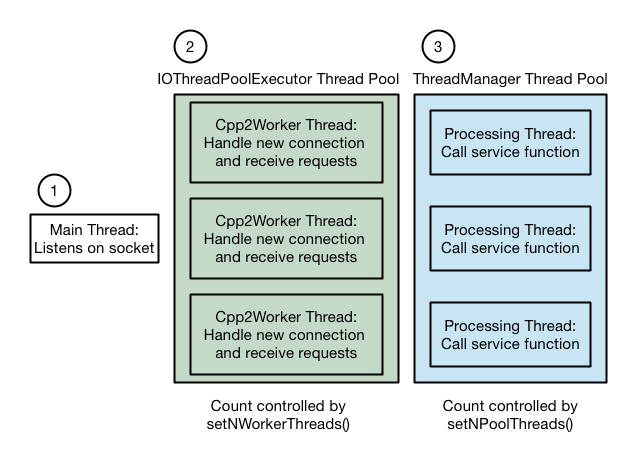
The ThriftServer provides two functions to control the number of threads: setNWorkerThreads and setNPoolThreads. The setNWorkerThreads works fine but the NumaThreadManager does not honor the setNPoolThreads. There are various possibilities to fix this
- Fix NumaThreadManager. Afterall, thrift is open source. Do it if you have time.
- Provide your own implementation of ThreadManager. Probably you should not be doing this.
- Tell ThriftServer to use SimpleThreadManager. The SimpleThreadManager is defined inside the thrift code but it is not smart thread manager as NumaThreadManager
- Run the service function in the IOThreadPoolExecutor thread itself rather than in a separate thread. And you can control the number of threads in IOThreadPoolExecutor.
Let us see how #4 can be used From the first example, compile the calculator.thrift as
python -m thrift_compiler.main --gen cpp2:process_in_event_base calculator.thrift
Then change the server code to
#include <iostream>
#include "gen-cpp2/Calculator.h"
#include <thrift/lib/cpp2/server/ThriftServer.h>

using namespace std;
using namespace apache::thrift;
using namespace example::cpp2;

DECLARE_string(sasl_policy);

class CalculatorSvc : public CalculatorSvIf
{
 public:
  virtual ~CalculatorSvc() {}
  void async_eb_add(
    std::unique_ptr<apache::thrift::HandlerCallback<int64_t>> callback,
    int32_t num1,
    int32_t num2) {
    callback->result(num1 + num2);
  }
};

int main(int argc, char **argv) {
  std::shared_ptr<CalculatorSvc> ptr(new  CalculatorSvc());
  // Disable Sasl. It can be done on commandline too
  FLAGS_sasl_policy = "disabled";
  ThriftServer* s = new ThriftServer();
  s->setNWorkerThreads(1);
  // Tell thrift server to not use NumaThreadManager
  s->setThreadManager(
    apache::thrift::concurrency::ThreadManager::newSimpleThreadManager());
  s->setInterface(ptr);
  s->setPort(8080);
  s->serve();
  return 0;
}
Compile the server as done previously. And run the server. Now the server process has only two threads including the main thread. Now we do not have any thread manager thread. There is a main thread on which the thrift server listens and another IOThreadPoolExecutor thread which receives the request and calls the service function in the same thread. If you want, you can increase the number of threads in IOThreadPoolExecutor. Also Sasl is disabled in this code. You can enable it if you need it. If enabled, it will create a separate thread.
Simplifying the server to server communication example
In server to server communication example, we had to run code in a separate thread. Now because we are running the service function in the IOThreadPoolExecutor thread, we do not need to delegate the work in the other thread. Now remove the async_tm_add function from that code and add this function
void async_eb_add(
  std::unique_ptr<apache::thrift::HandlerCallback<int64_t>> callback,
  int32_t num1,
  int32_t num2)
{
  cout << "Got async request " << num1 << " + " << num2 << endl;
  CallbackWrapper cb(callback);
  CalculatorAsyncClient* client = getClient(cb.ptr->getEventBase());;
  // Make the add function call on the real server
  folly::wangle::Future<int64_t> f = client->future_add(num1, num2);
  f.then(
      [cb](Try<int64_t>&& t) {
      // Now we have received the response from real calculator server
      // respond to the client with the same result
      cout << "Received response from other server" << endl;
      cb.ptr->result(t.value());
      });
}